

Download IrfanView (64-bit) – Image Viewer, Image Converter, Batch Processing, Photo Editor, 64-bit
Overview
IrfanView (64-bit) is a lightweight, fast, and highly efficient image viewer and converter designed for users who require reliable performance across a broad spectrum of image formats. Developed by Irfan Skiljan, the application serves as a powerful utility for both casual users and professionals seeking a streamlined solution for managing digital images. Its primary purpose is to provide seamless viewing, editing, and conversion capabilities without the overhead of resource-heavy software.
The app excels in handling large volumes of image files, making it particularly useful for photographers, designers, and anyone managing digital photo libraries. Real-world use cases include organizing photo collections, preparing images for web or print, and converting files between formats such as JPEG, PNG, BMP, TIFF, and many others. The developer has prioritized speed and minimal system impact, ensuring that the application remains responsive even when working with high-resolution files.
IrfanView (64-bit) is especially valuable in the productivity ecosystem for users who need a no-frills, dependable tool that performs consistently across different workflows. Its free availability enhances its accessibility, making it a go-to choice for individuals and organizations alike. Although the developer did not provide additional technical details, the app’s reputation and widespread use underscore its reliability and effectiveness in real-world environments.
Key Features & Functionality
- Wide Range of Supported Formats: IrfanView (64-bit) supports an extensive library of image formats, including JPEG, PNG, BMP, TIFF, GIF, PSD, RAW, and more. This ensures users can open and work with nearly any image file without needing additional software or converters.
- Batch Conversion and Editing: The app enables users to process multiple images at once, applying consistent changes such as resizing, format conversion, and watermarking. This is ideal for preparing large sets of photos for websites, portfolios, or archives.
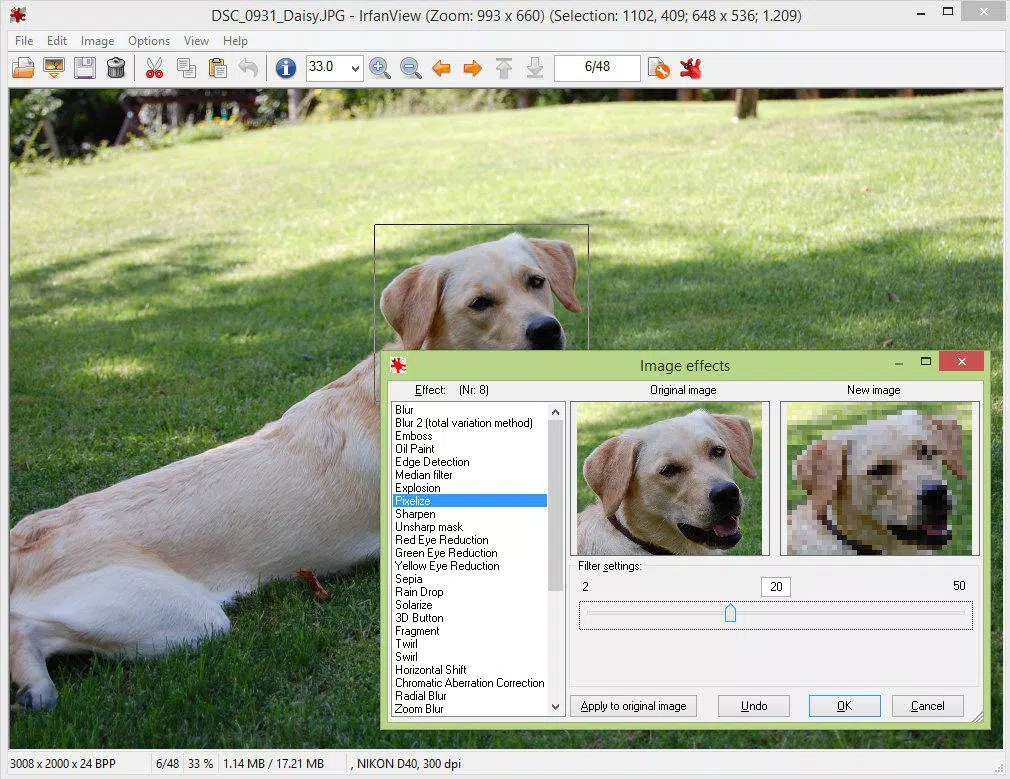
- Advanced Editing Tools: Features like color depth adjustment, cropping, IPTC metadata editing, lossless JPG manipulation, and image capture allow for precise control over image quality and content, catering to both amateur and professional workflows.
- Slideshow and Presentation Mode: Users can create dynamic image presentations with customizable transitions, timing, and playback options, useful for sharing visual content during meetings or personal exhibitions.
- Customizable Interface and Skins: The software supports toolbar skins and customizable hotkeys, allowing users to tailor the interface to their preferences, improving efficiency and personalizing the experience.
- Plugin and Command-Line Support: IrfanView (64-bit) integrates with third-party plugins and offers command-line functionality, enabling automation and integration into larger workflows or scripts.
Each feature is designed to enhance productivity. For example, batch processing saves hours when converting hundreds of images, while the slideshow feature turns static photo albums into engaging visual narratives. The ability to edit metadata and apply lossless edits ensures that image integrity is preserved during workflows.
Interface, UX & Performance
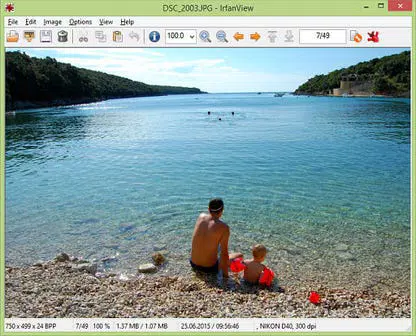
The interface of IrfanView (64-bit) is clean, minimal, and highly functional, emphasizing speed and accessibility. The layout places essential tools within easy reach, with a central image preview area flanked by navigation and control panels. The visual style is straightforward, avoiding unnecessary graphics to maintain performance.
Navigation is intuitive, with keyboard shortcuts and context menus supporting quick access to features. Users can browse directories swiftly, and the thumbnail view allows for rapid file selection. Although the developer did not list formal performance metrics, the app’s lightweight nature—only 3.3 MB in size—suggests efficient memory usage and fast startup times.
The software remains responsive even on older hardware, making it suitable for a wide range of Windows devices. Responsiveness during image loading and editing operations is consistent, with minimal lag. Stability is a key strength, with users reporting reliable operation over extended sessions.
The app handles large files and high-resolution images without crashing, indicating solid backend architecture. While the interface may appear dated to some, its simplicity ensures a low learning curve and high usability for all skill levels.
Platform Compatibility & Technical Requirements
IrfanView (64-bit) is designed exclusively for the Windows platform and requires a compatible 64-bit Windows operating system. The current version is 4.72, released on May 25, 2024. The application has a compact file size of 3.3 MB, which contributes to fast installation and minimal disk usage.
Specific requirements were not listed, so compatibility with older or newer Windows versions cannot be confirmed. The developer did not specify minimum OS requirements, nor did they provide information about system RAM, CPU, or graphics capabilities. However, the app’s small footprint and proven performance on legacy systems suggest broad compatibility across modern and older Windows environments.
Users should ensure their system supports 64-bit applications before installation. The app is available as a free download, making it accessible to a wide audience without financial barriers.
Pros and Cons
Pros
- Extremely lightweight with a file size of just 3.3 MB
- Supports a vast number of image formats without additional plugins
- Free to download and use with no hidden costs
- Efficient batch processing for large-scale image management
- Highly customizable interface with skins and hotkeys
- Stable and reliable performance across different hardware
Cons
- Available only for Windows, with no support for Android or iOS
- Interface may appear outdated to users accustomed to modern design trends
- Advanced features require some learning curve for absolute beginners
- Developer did not specify minimum system requirements
- Limited integration with cloud-based services or mobile platforms
FAQ
Is IrfanView (64-bit) safe to download and install?
Yes, IrfanView (64-bit) is a trusted and secure application developed by Irfan Skiljan. It is distributed free of charge and does not include malware or adware. Users should download the app only from official or verified sources to ensure authenticity.
Can I use IrfanView (64-bit) on older Windows systems?
While the developer did not specify minimum OS requirements, the app’s lightweight design and 64-bit architecture suggest compatibility with modern Windows versions. However, users should verify that their system supports 64-bit applications before installation.
Does IrfanView (64-bit) support batch editing of images?
Yes, the software includes robust batch conversion and editing features, allowing users to apply changes such as resizing, format conversion, watermarking, and color adjustments to multiple images simultaneously.
Is IrfanView (64-bit) available for Android or iOS?
No, IrfanView (64-bit) is currently only available for Windows. There is no official version for Android or iOS devices.
How often is IrfanView (64-bit) updated?
The latest version, 4.72, was released on May 25, 2024. The developer maintains regular updates to improve functionality, fix bugs, and enhance compatibility, though the frequency of updates is not publicly detailed.
Final Thoughts
IrfanView (64-bit) stands out as a powerful, no-nonsense tool in the image management space. Its combination of speed, versatility, and zero cost makes it an indispensable utility for anyone working with digital images on Windows. Whether you're a photographer organizing a shoot, a designer preparing assets, or a casual user managing a photo library, this app delivers consistent performance without compromise.
The extensive format support, batch processing, and customization options ensure that users can adapt the software to their unique needs. While its interface may not reflect modern design standards, its functionality and reliability far outweigh this minor drawback. For users seeking a secure, efficient, and free image viewer and converter, IrfanView (64-bit) is an excellent choice.
Download IrfanView (64-bit) now and experience a streamlined, professional-grade image workflow on your desktop.


